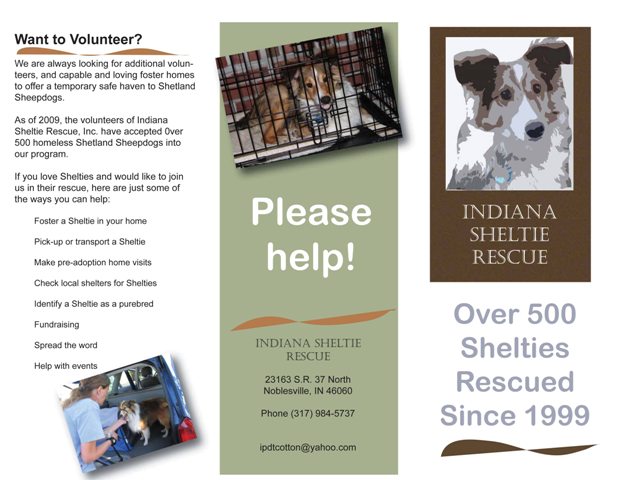
Indiana Sheltie Rescue Brochure

When it comes to the Adobe products, I feel like my head is made of putty.  I am keeping my grades at an A by doing extra credit.

This was the second project and again, I got an 85%.  Not sure why… and yes, I asked the question several times “what would have made it better.”  No answer, I was just told “it could have been better.”  Since I hit all the technical pieces, that does not tell me anything… give me a reason and give me something to go on.

Subjective grading really frosts me because there is no way you can work towards that undefined goal.

Anyway, here is the brochure… (I gave it to the rescue group when I was done.)  The brochure features our dogs and one of the dogs we helped rescue.

Indiana Sheltie Rescue brochure

Indiana Sheltie Rescue brochure

Oh my passion, how may I capture thee?

Capture your passion, what drives you, and package it.

tag

Some of the students came up with some really innovative ideas! One had hers on a cd with a song she wrote and sang.  Another put hand wrapped candies in a pinata.  The wrappings had tags on them about her.  Another put his in fancy glass bottles.  And it goes on.  This is a very talented class!  On top of it, we have a fantastic teacher… a powerful combination that pushes me to work my hardest.

Me, I wrapped mine up in a quilt with a special made tag.

My passion is contained in words, actually, and I started this project by writing words that capture what inspires me to be creative:

  • gifting – I love to make purposeful gifts
  • writing – keeping in touch with people who mean something to me
  • promoting relationships – it thrills me to make items that bring people closer and promote their relationships

Quilting was a perfect way to show these traits and I had the perfect quilt on hand that I had made 2 summers ago.  “Not Your Grandmother’s Tumbling Blocks” has a colorful, fanciful, and diverse pattern and a warm and fuzzy backing.  It was perfect.

I bundled it up fancy, tied it with a ribbon, and attached a simple tag that actually took a lot of work to “perfect”.

bundled quilt

Tag contents:

tag

tag

IMG_3381sm

A Root Canal? Oh ick!

Our maple tree was pretty this year.

Our maple tree was pretty this year.

2nd week into the new quarter and I just had to schedule my very first root canal.  It messed up my creative time for one Thurs. afternoon, to put it mildly!  And then I was in pain for nearly a week until we got the bite adjusted.

Genesis 1:4 – God Seperated the Light from Dark

Georgia O’Keeffe I am not… but I preferred copying some of her ideas as opposed to Picasso! 

Assignment:  We were given a list of artists to pick from.  Then we were to take one of their paintings and photo copy it in black and white.  From that point, we were to take the anachromatic forms and give it life using 1 color (a hue and its tint, tone, and shade) to paint half the piece.  Any half we desired.  The other half was to be done greyscale.

My hue was a tertiary color: orange-yellow.  It almost looks green when black is added to it and I liked that.

Remember, I don’t do acrylics, but this quarter I just have to suck it up and do it.  But here is the really funny part…this has gotten rave reviews!  Charlotte claimed it for her own, the teacher requested to display it next quarter, and even my very country sister-in-law, Annie, likes it!!! 

When I was done, Charlotte thought it looked like the point in Genesis when God seperated the light from the dark.  I liked that.  Don’t you think that the first verses of Genesis were probably quite a tremendous and chaotic time in the earth’s history?

Maybe I missed my calling by sticking with realism and oils or watercolors!

Gen. 1:4 - ...and God seperated the light from the darkness

Gen. 1:4 - ...and God seperated the light from the darkness

Using Adobe Illustrator brushes

The very first Illustrator class was loads easier than Photoshop.  One big difference is how the teacher is presenting the class.  Very well done.

However, my first assignment only netted me an 85%.  I am struggling a bit to get my head around the whole Adobe software setup, so I spent more time figuring out how to use the tools than trying to smooth out the look of the piece.  It is very rough.

Assignment:  Paint over the top of a photo of yourself using the “brushes” and “pen” tools.

Sheri boating

Original Me

Adobe Illustrator

Illustrated Me

Web Design…ummmm yea…

My online class this quarter is Introduction to the World Wide Web.  We will be learning basic html and creating our own site in Microsoft Notepad!  I was told by a web designer whose work I highly admire that this is nothing short of “masochistic”.  Nuff said!  At least the class only lasts 5.5 weeks; however, the homework is double (as if I were taking 2 classes.)

My Puddy Tat…

1st project for Design Concepts was a 9 panel of an organic object. I chose my Tacey because I can not do anything easy! I need to break that propensity! However, I get nervous about drawing cats and feel I can not do it, so I thought it would be a good stretch.

First…collect photo references of your topic. Ha!  The trouble was to narrow it down!  Here are a very few of them…

Tacey Photo Reference Panel 1

Tacey Photo Reference Panel 1

Tacey Photo Reference Panel 2

Tacey Photo Reference Panel 2

(Isn’t she purdy?)

In our Process Binder we had to include exercises that we were assigned and preliminary thumbnail sketches.  (This one is my favorite because this is a whole new style of sketching for me.  I think I could get better at it and really enjoy it!)

Tacey whoopin' on Toby our pup

Tacey whoopin' on Toby our pup

The final product had to use 9 different styles from our exercises, including a photo from our photo references.  I chose to use about 3 styles that I had never done before (can you tell which ones those are?)  My favorite blocks are:

  • my large photo
  • the upper left pastel picture
  • the outline in the blue block at the top 

My design concept was to showcase her catly (is that a word?) form, while highlighting the blue of her eyes. 

I was right, it was a stretch, and it was loads of fun!!! I will let you judge on the outcome (however, I did get an A and the teacher kept it to put on the wall next quarter.  Oh, and the instructor called it “powerful”, which really suprised me.  “Serene” was more the word I was thinking. Except for the one wild cat picture, that is.)

IMG_3371sm

Oh…here is the photo reference for that favorite sketch of mine:
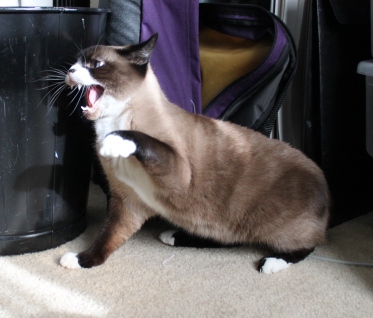
IMG_3266

Toby was getting his nose wacked…again.
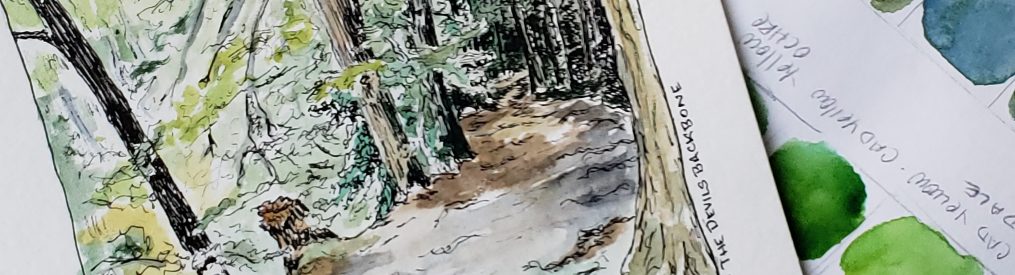
Process Binder…

Now here is the class that is really going to challenge me this quarter: Design Concepts!

Beth Remsburg is our teacher. I followed her into class on Tues. morning thinking she was one of the students in the class, which I found very amusing when she stepped behind the desk and began addressing us. Her background is fascinating.  She was an elementary special education teacher, then went back to college to get a degree in graphic design.  She worked that for years and loved it and is now teaching older students graphic design techniques. 

This class is going to be all about discovering our own personal process for creating and how to break out of “dead” zones.

Process binder front cover

Process binder front cover

The first thing we had to do was create a process binder where we detail out everything we do for the next 11 weeks. That alone takes time because I decided I did not want my original sketches, photos, etc. in it, so everything has to be scanned.  I also put most things in plastic sleeves.  It will be a nice piece of work in itself by the end of the year!

As we go through this quarter we will be trying out various processes in order to find what works for us and to give us tools for breaking through those times when we are not feeling any inspiration.  As Beth said, we must if we plan to make a living at this!  You don’t get paid to wait for inspiration.

First week we included photos of our creative space(s) and also examples from our sketchbook (we ARE in an art school so it was expected that we have one of those) …

Florida-one of my favorite sketching spots

Florida-one of my favorite sketching spots

Thumbnails of dogs while at an agility training class

Thumbnails of dogs while at an agility training class

Primary, Secondary, Tertiary…oh what fun

Color Theory started out with a bang… NOT!

The first 2 classes were all about taking our 3 primary colors (red, blue, and yellow) and white and black, mixing them all and coming up with a very tedious color wheel and then a color panel. We did all this with our Liquitex acrylics. I despise mixing acrylics, so there you go! A dull few weeks as we kicked off the quarter and to add to that, we were not allowed to be creative with it.  It was just an exercise in color mixing.

However, it was easy on the brain, which was really nice!  I was so stressed with the overload of projects and doing an online class in 5 weeks, that for this alone I was grateful for the menial tasks in Color Theory.

Primary:  Red Yellow Blue

Secondary: Orange Green Violet (purple)

Tertiary: the colors in between each of those such as yellow-orange and red-orange.

Color Wheel

Color Wheel

For the panel, you pretty much mix up a big pile of the color on the left, then divide it into 4 piles.  Add white to one, black to another, and a grey you mixed to another.  Bada bing…

To add to the tediousness, you then have to cut out a 1 inch square of each color called a paint chip (like in a paint store) and paste it onto another page. 

Excuse the bad photography…it was a last minute snap before taking it to class. 

Primary color / add white (tint) / add black (tone) / add grey (shade)

Starting color / add white (tint) / add black (shade) / add grey (tone)

Week One of the Fall Quarter

I am not sure what it is about starting a new quarter, but it gives me a nervous stomach! However, I was doing 2 new things this time… an online class on html and tutoring (work study!)

I thought…ooohhh…I can get a head start with this online class, so I spent about 4 hours on Friday (of my week off) and then some on Sat. and then again on Monday. On Monday I began working on my first homework due on Tues. when I began to realize I was in way over my head. (By then I was freaking out a bit!) With a little more investigation, calling my teacher (who seemed to think we were fine), and finding one little line that said I need a prerequisite, I winged off a panic filled email to my student advisor.

Tuesday I was at the school all day and dear Heather caught up with me… she did her own investigation and quickly enrolled me in the right course. However…that meant I had to catch up on everything that night so I could hit that evening’s deadline for the new class!

At that point I knew I was chasing a train for the week. 

On Wed. I began tutoring (teachers assistant) in the computer class (Microsoft Office) for 4 hours. Then in the evening I am in the student affairs office for 2 hours for one-on-one tutoring as needed by the students and monitoring the front desk as a pseudo receptionist when not tutoring.  After the first 2 weeks I began to realize this is a great way to get my face known around campus, if that had been my goal (it was not but it won’t hurt anything.)